上一篇整理了Dispatcher的消息循环和BeginInvoke机制, 这一篇继续深入窥探一下DispatcherFrame.1
2
3
4
5
6
7
8
9
10
11
12
13
14
15
16
17
18
19
20
21
22
23
24
25
26
27
28
29
30
31
32
33
34
35
36
37
38
39
40
41
42
43
44
45
46
47
48
49
50
51
52
53
54
55
56
57
58//Dispatcher.cs
private void PushFrameImpl(DispatcherFrame frame)
//<SecurityNote>
// Critical - as this calls critical methods (GetMessage, TranslateMessage, DispatchMessage).
// TreatAsSafe - as the critical method is not leaked out, and not controlled by external inputs.
//</SecurityNote>
[SecurityCritical, SecurityTreatAsSafe ]
private void PushFrameImpl(DispatcherFrame frame)
{
SynchronizationContext oldSyncContext = null;
SynchronizationContext newSyncContext = null;
MSG msg = new MSG();
_frameDepth++;
try
{
// Change the CLR SynchronizationContext to be compatable with our Dispatcher.
oldSyncContext = SynchronizationContext.Current;
newSyncContext = new DispatcherSynchronizationContext(this);
SynchronizationContext.SetSynchronizationContext(newSyncContext);
try
{
while(frame.Continue)
{
if (!GetMessage(ref msg, IntPtr.Zero, 0, 0))
break;
TranslateAndDispatchMessage(ref msg);
}
// If this was the last frame to exit after a quit, we
// can now dispose the dispatcher.
if(_frameDepth == 1)
{
if(_hasShutdownStarted)
{
ShutdownImpl();
}
}
}
finally
{
// Restore the old SynchronizationContext.
SynchronizationContext.SetSynchronizationContext(oldSyncContext);
}
}
finally
{
_frameDepth--;
if(_frameDepth == 0)
{
// We have exited all frames.
_exitAllFrames = false;
}
}
}
DispatcherFrame的代码如下,1
2
3
4
5
6
7
8
9
10
11
12
13
14
15
16
17
18
19
20
21
22
23
24
25
26
27
28
29
30
31
32
33
34
35
36
37
38
39
40
41
42
43
44
45
46
47
48
49
50
51
52
53
54
55
56
57
58
59
60
61
62
63
64
65
66
67
68
69
70
71
72
73
74
75
76
77
78
79
80
81
82
83
84
85
86
87
88
89
90
91
92
93
94
95
96
97
98
99
100
101
102
103
104
105using System;
using System.Security;
namespace System.Windows.Threading
{
/// <summary>
/// Representation of Dispatcher frame.
/// </summary>
public class DispatcherFrame : DispatcherObject
{
/// <SecurityNote>
/// Critical: This code exists to ensure that the static variables initialized
/// do not cause security violations.The reason this comes into existance is because
/// of the call to RegisterWindowMessage
/// TreatAsSafe:This is safe to call
/// </SecurityNote>
[]
static DispatcherFrame()
{
}
/// <summary>
/// Constructs a new instance of the DispatcherFrame class.
/// </summary>
public DispatcherFrame() : this(true)
{
}
/// <summary>
/// Constructs a new instance of the DispatcherFrame class.
/// </summary>
/// <param name="exitWhenRequested">
/// Indicates whether or not this frame will exit when all frames
/// are requested to exit.
/// <p/>
/// Dispatcher frames typically break down into two categories:
/// 1) Long running, general purpose frames, that exit only when
/// told to. These frames should exit when requested.
/// 2) Short running, very specific frames that exit themselves
/// when an important criteria is met. These frames may
/// consider not exiting when requested in favor of waiting
/// for their important criteria to be met. These frames
/// should have a timeout associated with them.
/// </param>
public DispatcherFrame(bool exitWhenRequested)
{
_exitWhenRequested = exitWhenRequested;
_continue = true;
}
/// <summary>
/// Indicates that this dispatcher frame should exit.
/// </summary>
/// <SecurityNote>
/// Critical - calls a critical method - postThreadMessage.
/// PublicOK - all we're doing is posting a current message to our thread.
/// net effect is the dispatcher "wakes up"
/// and uses the continue flag ( which may have just changed).
/// </SecurityNote>
public bool Continue
{
get
{
// This method is free-threaded.
// First check if this frame wants to continue.
bool shouldContinue = _continue;
if(shouldContinue)
{
// This frame wants to continue, so next check if it will
// respect the "exit requests" from the dispatcher.
if(_exitWhenRequested)
{
Dispatcher dispatcher = Dispatcher;
// This frame is willing to respect the "exit requests" of
// the dispatcher, so check them.
if(dispatcher._exitAllFrames || dispatcher._hasShutdownStarted)
{
shouldContinue = false;
}
}
}
return shouldContinue;
}
[]
set
{
// This method is free-threaded.
_continue = value;
// Post a message so that the message pump will wake up and
// check our continue state.
Dispatcher.BeginInvoke(DispatcherPriority.Send, (DispatcherOperationCallback) delegate(object unused) {return null;}, null);
}
}
private bool _exitWhenRequested;
private bool _continue;
}
}
关于DispatcherFrame, Threading Model中https://docs.microsoft.com/en-us/dotnet/framework/wpf/advanced/threading-model有一节提到**Nested Pumping**
Sometimes it is not feasible to completely lock up the UI thread. Let’s consider the Show method of the MessageBox class. Show doesn’t return until the user clicks the OK button. It does, however, create a window that must have a message loop in order to be interactive. While we are waiting for the user to click OK, the original application window does not respond to user input. It does, however, continue to process paint messages. The original window redraws itself when covered and revealed.(移动MessageBox, 它后面的background window会重绘, 但又无法响应用户的输入)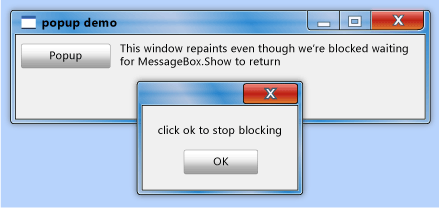
Some thread must be in charge of the message box window. WPF could create a new thread just for the message box window, but this thread would be unable to paint the disabled elements in the original window (remember the earlier discussion of mutual exclusion.线程A无法修改线程B中的UI元素, 所以messageBox中启动了另一个线程的假设不成立). Instead, WPF uses a nested message processing system. The Dispatcher class includes a special method called PushFrame, which stores an application’s current execution point then begins a new message loop. When the nested message loop finishes, execution resumes after the original PushFrame call.
In this case, PushFrame maintains the program context at the call to MessageBox.Show, and it starts a new message loop to repaint the background window and handle input to the message box window(重绘background window, 是由new message loop负责的). When the user clicks OK and clears the pop-up window, the nested loop exits and control resumes after the call to Show.
除了上面的Nested Pumping, MSDN中还提到了DispatcherFrame的另一个作用, 模拟实现Winform中Application的DoEvents功能1
2
3
4
5
6
7
8
9
10
11
12
13
14
15
16//https://msdn.microsoft.com/zh-cn/library/system.windows.threading.dispatcher.pushframe.aspx
public static class ApplicationExtensions
{
public static void DoEvents(this Application application)
{
DispatcherFrame frame = new DispatcherFrame();
Dispatcher.CurrentDispatcher.BeginInvoke(DispatcherPriority.Background, new ExitFrameHandler(frm => frm.Continue = false), frame);
Dispatcher.PushFrame(frame);
}
private delegate void ExitFrameHandler(DispatcherFrame frame);
}
Application.DoEvents方法有什么作用, 看如下代码:1
2
3
4
5
6
7
8private void button1_Click(object sender, EventArgs e)
{
for (int i = 0; i < 10000; i++)
{
label1.Text = i.ToString();
Application.DoEvents();
}
}
该方法是想让label的文本从0更新到9999. 如果注释掉Application.DoEvents(), Label只会最后显示一个9999; 而加上Application.DoEvents(), label会有一个从0到9999的跳变过程.
label1.Text = i.ToString(); 这一行需要更新lable1, 其实是有一个repaint消息. 但由于UI线程正在执行for循环,没有空闲去处理该消息. 所以在没有Application.DoEvents(); 的情况下, 只有等UI线程执行完for循环后, UI线程才会去处理repaint消息, label才会更新.如果加了Application.DoEvents(), 该方法的功能就是强制UI线程去执行消息队列中的消息, 即使在for循环中. 于是label能够实时得到更新.
Dispatcher.PushFrame(frame);强制启动了一个新的loop. UI线程会保存PushFrame之前的context. 该loop会将dispatcher queue中的所有消息进行处理, 最后退出. repaint, mousemove等都是在dispatcher queue中
即每一次迭代, 都强制启动了一个loop, 去处理所有消息队列中的消息. 这样每一次迭代, label都可以得到更新. 如果不强制启动新loop, UI线程的dispatcher都在处理for循环, 没有空闲去处理消息队列中的其他消息.1
Dispatcher.CurrentDispatcher.BeginInvoke(DispatcherPriority.Background, new ExitFrameHandler(frm => frm.Continue = false), frame);
这一行的意思是在dispatcher queue中添加一个dispatchOperation, 该operation的作用是将DispatcherFrame的Continue属性设为false, 如此就能退出loop. 由于它的优先级是Background, 该dispatchOperation会在消息队列中的末端, 最后执行.
即处理完消息队列中的所有消息后退出loop.
下面是Winforms中对Application.DoEvents()的解释https://msdn.microsoft.com/en-us/library/system.windows.forms.application.doevents.aspx
When you run a Windows Form, it creates the new form, which then waits for events to handle. Each time the form handles an event, it processes all the code associated with that event. All other events wait in the queue. While your code handles the event, your application does not respond. For example, the window does not repaint if another window is dragged on top.
If you call DoEvents in your code, your application can handle the other events. For example, if you have a form that adds data to a ListBox and add DoEvents to your code, your form repaints when another window is dragged over it. If you remove DoEvents from your code, your form will not repaint until the click event handler of the button is finished executing. For more information on messaging, see User Input in Windows Forms.
Unlike Visual Basic 6.0, the DoEvents method does not call the Thread.Sleep method.Typically, you use this method in a loop to process messages.
不过用Application.DoEvents也会带来一些问题, 参考https://blogs.msdn.microsoft.com/jfoscoding/2005/08/06/keeping-your-ui-responsive-and-the-dangers-of-application-doevents/
其他参考: